Instagram Account Lock – Why it Happens and What to Do
(Updated February 18, 2022)
In recent weeks, Instagram has cracked down on users who have violated their Community Guidelines. As a part of this process, Instagram casts a wide net around certain areas, so many users who have not actually violated anything are also getting an Instagram Account Lock notification. Here’s how to know if you have actually violated Instagram’s Community Guidelines and what to do if your account has been locked.
Is this caused by my subscription to SRD Social?
No. SRD Social is not a growth service because we do not actively engage “as you” on Instagram. This means that we do not follow, like, comment or send direct messages on your behalf. SRD Social provides content and automated posting services using methods that are 100% in line with Instagram’s Community Guidelines.
Why is Instagram locking accounts?
For the past few months, Instagram has had a big problem with users purchasing fake likes and followers. This can be done directly (the user themselves actually purchasing the fake likes/followers) but it’s more commonly done through subscribing to a “growth service”. These growth services promise to improve the success of their client’s Instagram profiles by giving them more followers, likes, comments, and general interaction. While many of these services are not doing anything untoward, there are a few that purchase likes and followers for their client’s accounts to quickly increase the size of their following. This goes directly against Instagram’s Community Guidelines and can cause the Instagram account to lock and even a complete ban from Instagram.
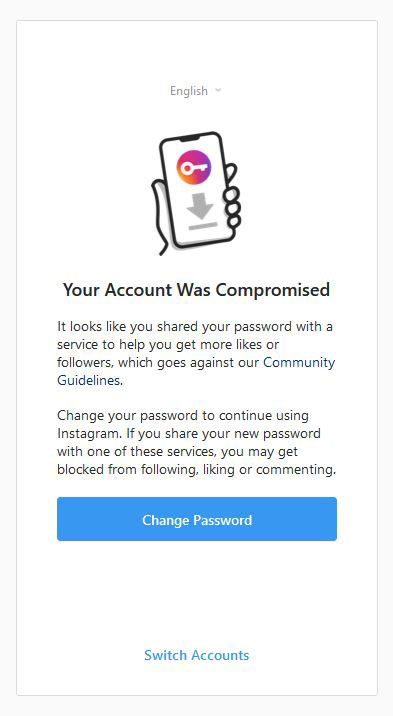
Here’s an example of what the Instagram account lock message might look like:
Why was MY Instagram account locked out?
First, we’d like to make it clear that this lockout does not mean that you have done something that goes against Instagram’s Community Guidelines. The beginning of the message says “It looks like…” so Instagram isn’t saying you have done something, they’re just saying it appears that you may have done something.
So, if you haven’t done anything wrong, why did you get the message?
When you access the internet, your device uses an IP address to identify you and your general location. Occasionally, a group of IP addresses can be flagged as having been involved in the spammy activity. The location of a specific IP address is not precise, and most IP addresses are shared (meaning it’s used by more than one person). Because of that, Instagram cannot be certain exactly where the potential “spammer” is or exactly who they are. In order to stop the potential spammer, Instagram will lock the accounts of anyone who uses a flagged IP address and/or is in a certain flagged area. Even just driving through a flagged area while Instagram is open can cause your account to get locked.
I haven’t purchased any followers or subscribed to a growth service, so what do I do?
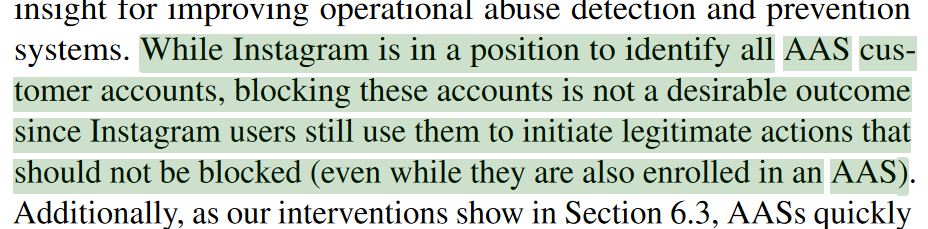
The first step is to change your password; this message is more of a deterrent than a notice of action. Their goal here is to prevent users from abusing the system. In fact, the Instagram Automation Abuse Team participated in a research paper which states that they have no intention of banning accounts that use Account Automation Services (AAS):
If you change your password then get locked out again, your account may have been hacked (keep reading).
What if I HAVE purchased likes or subscribed to a growth service?
Say that you have purchased likes or followers, so the Instagram account lock message is accurate – the only thing you can do is stop using the purchased likes/followers. If you have subscribed to a growth service, check to see if they are artificially collecting likes, followers, comments, etc. for your account. They should say exactly what they’re doing and how they’re growing your account – if they don’t (or if they come out and say they’re using artificially collected likes/followers) unsubscribe immediately and choose a different service. There is no quick way to grow your following on Instagram – it’s a slow process that requires a lot of work and dedication. While we’re talking about growing your Instagram, did you know that purchasing likes/followers can actually HURT your brand? Check out this article from AdEspresso by Hootsuite to learn why it can hurt your brand, and what to do instead.
My Instagram has been hacked! How do I fix it?
In July 2021 Instagram launched a new feature called “Security Checkup” to a select few users. The goal of Security Checkup is to guide people with hacked accounts through the steps needed to secure them. Here’s the good news: on February 8, 2022 (#SaferInternetDay) Instagram announced that Security Checkup is now available to all users! This will allow you to ensure you have a strong password and enable two-factor authentication using WhatsApp, your phone number, or an authenticator app.
If your Instagram account is locked, Instagram should automatically take you to Security Checkup to unlock your account. If it doesn’t work or you can’t access it, here are some other options (be sure to try them in the order listed below):
- Check Your Email
- If your email address was changed, Instagram will send you an email informing you of the change. If you didn’t do this, you may be able to undo it by clicking “revert this change” in that email message.
- Request a Login Link
- If you still have access to the email address or phone number associated with your account, you can request a login link from Instagram:
- On the login screen tap “Get help logging in” or “Forgot password?”
- Enter your username, email address, or phone number then tap “Next”. If you don’t know the username, email, or phone number tap “Need more help” and follow the on-screen instructions.
- Select either your email or phone number and tap “Send login link”.
- Click the link in your email or text message and follow the on-screen instructions.
- If you still have access to the email address or phone number associated with your account, you can request a login link from Instagram:
- Request a Security Code or Support from Instagram
- If neither of the options above work, you can request additional support from Instagram:
- FOR ANDROID USERS:
- On the login screen tap “Get help logging in.”
- Enter the username, email address, or phone number then tap “Need more help” under the “Next” button.
- Tap “Need more help” then follow the on-screen instructions.
- Select either your email or phone number, then tap “Send security code.”
- If you don’t receive a security code, tap “I can’t access this email or phone number” and follow the on-screen instructions.
- FOR IPHONE USERS
- On the login screen tap “Need more help?” below “Send login link.”
- Select either your email or phone number, then tap “Send security code.”
- If you don’t receive a security code, tap “I can’t access this email or phone number” and follow the on-screen instructions.
- FOR ANDROID USERS:
- If neither of the options above work, you can request additional support from Instagram:
- If all else fails, you can try contacting Instagram here. Officially this contact form is to “improve Instagram login support” for users who have trouble accessing their account. However, they may respond with additional support options.
If you can still log into your Instagram account, follow these steps to go through the Security Checkup and secure your account:
- Open Instagram on your phone
- Go to your profile and tap the menu in the upper right corner
- Tap Settings > Security > Security Checkup
Using Instagram is a great way to grow your business, but sometimes it can be troublesome! If you have any thoughts or questions about this article or would like to know how to grow your business using Instagram, reach out to us on Facebook or Twitter.

 Steady Radiance Design, LLC
 Steady Radiance Design, LLC